
Linton Public School families—before you can begin using Infinite Campus, please make sure you complete your one-time account activation.
📧 STEP 1: CHECK YOUR EMAIL
Look for the email from Linton Public School containing your unique Infinite Campus Activation Link and Activation Key. This link/key is unique to you and is used to create your Parent Portal account.
✅ STEP 2: COMPLETE YOUR ACTIVATION
Follow the link in the email and complete the activation process to create your Infinite Campus username and password.
🌐 STEP 3: ACCESS INFINITE CAMPUS
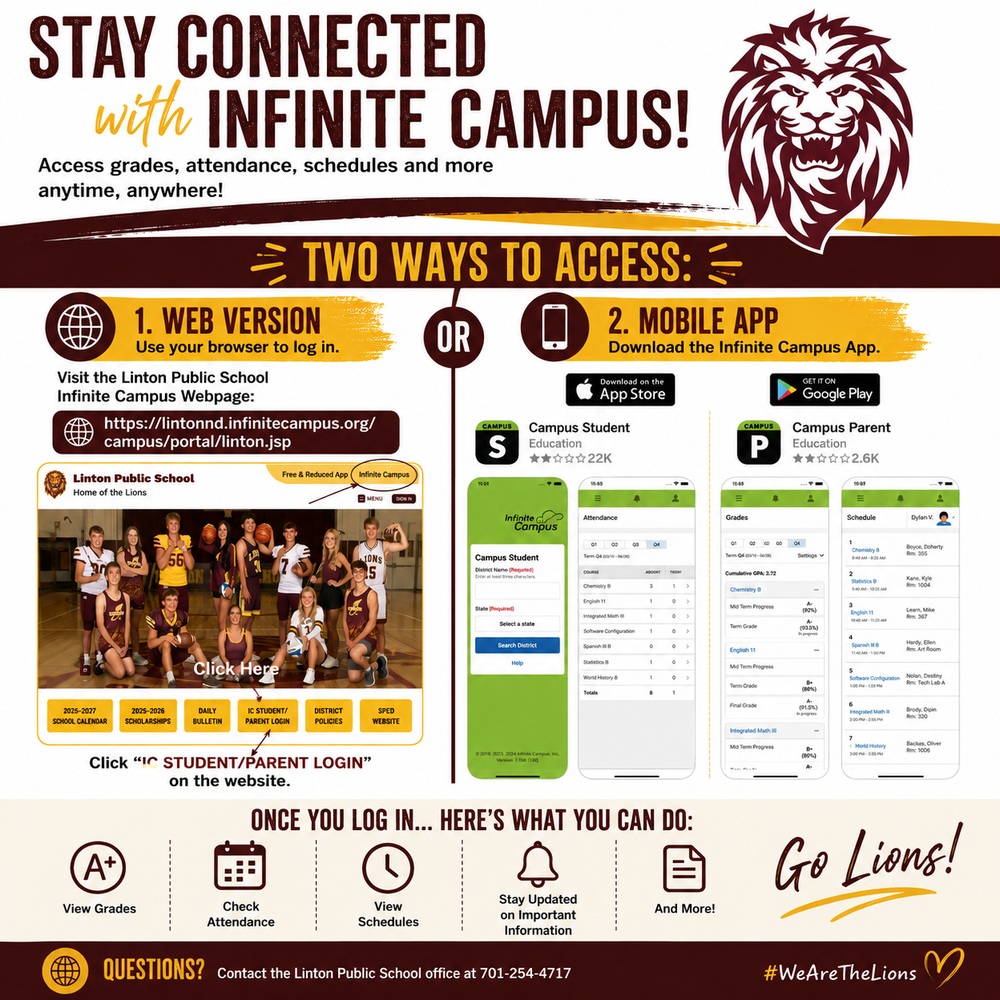
Once your account has been activated, you can access Infinite Campus anytime using our Linton-specific portal:
Web Version:
https://lintonnd.infinitecampus.org/campus/portal/linton.jsp
You can also access the portal directly from the Linton Public School website by clicking Infinite Campus at the top of the page or IC STUDENT/PARENT LOGIN on the homepage.
📲 OR DOWNLOAD THE APP
Download Campus Parent for parents/guardians or Campus Student for students from the Apple App Store or Google Play.
When setting up the app, search for "Linton 36" and select our district to connect to the correct Infinite Campus portal.
Once you're logged in, you'll have convenient access to grades, attendance, schedules, assignments, important information, and more!
🦁 Welcome to Infinite Campus, Lions!